Why the listed MLS match time can differ from kickoff
An MLS listing can identify the match’s advertised time while the scheduled first whistle comes later. The clearest way to resolve the apparent delay is to find an explicit actual-kickoff entry for that particular fixture. Seattle’s October 28, 2026 home match provides a useful example: the club’s matchday guide separates a 7:30 p.m. match time from a 7:40 p.m. actual kickoff.
That distinction matters when you open a broadcast and find introductions instead of the ball moving. Your stream may be working perfectly. You may have arrived at the beginning of the presentation rather than the beginning of play. Before diagnosing a technical fault, compare what the listing actually calls the time with the club’s more detailed event instructions.
There are three separate questions to ask. When should I tune in? When is the referee expected to start play? Has something happened that changes that expectation? A schedule tile may answer the first question adequately without answering the other two. An event guide can contain several different times because gates, pregame activity and the match itself serve different purposes.
Fans understandably find a loosely labeled start time frustrating. If you have arranged dinner, childcare or a short break around the first whistle, even a small discrepancy creates inconvenience. The useful response is clearer labeling. A generic claim that every match is always late does little to help you plan the next one, particularly when different fixtures can have different event instructions.
MLS also has a separate late-kick rule for a club that is not ready at the prescribed start. That does not mean every gap between a public listing and play is misconduct. Establish which time was prescribed before drawing that conclusion. Nor does the presence of a pregame commercial prove that an advertiser caused an unscheduled delay. The match-specific timeline is stronger evidence than guesses about motives.
For a quick daily overview, use our MLS games today page, then make the final check against the fixture’s club guide when the precise minute matters.
The Seattle example: 7:30 match time, 7:40 actual kickoff
The Sounders’ guide for their Wednesday, October 28, 2026 home game against Houston is unusually helpful because it separates three entries. Gates are listed for 6:30 p.m., match time for 7:30 p.m., and actual kickoff for 7:40 p.m. These are Seattle local times, in the Pacific time zone. The ten-minute difference is published in advance.
What the two official pages tell you
Seattle’s preview for the same fixture uses 7:30 p.m. PT in its kickoff description. A fan who reads only that preview could reasonably expect the ball to move then. The more detailed matchday guide supplies the additional actual-kickoff label. Reading both explains why two supporters can compare official information and still believe they were given different instructions.
For precise planning, the entry explicitly labeled actual kickoff is the more specific instruction. That is an editorial reading of the two pages, rather than a claim that every preview always lists television coverage. Keep the date and opponent alongside any time you save: a page called “Know Before You Go” can be updated for the next home match after this one.
Why ten minutes is an example, not a league-wide rule
Seattle’s first-matchday guide also separated the October 1 Sporting Kansas City fixture into a 6:30 p.m. match time and a 6:40 p.m. actual kickoff. That gives a second concrete example of the club’s labeling. It still does not establish that every MLS game, every broadcaster or every competition follows a compulsory ten-minute offset.
A remembered rule of thumb becomes risky when it replaces checking. A viewer who assumes there will always be ten spare minutes might miss an opening goal if another fixture starts at its published whistle time. Someone who adds ten minutes to an already explicit actual-kickoff entry would make the same mistake twice. The important detail is the meaning of the label, not the arithmetic alone.
Both examples describe published plans. They do not prove the referee actually started at the promised second, and they cannot rule out a later operational or weather change. Use them to understand the distinction, then look for the latest instructions for the match you intend to watch.
How to find the most useful time before you watch
Start by identifying the exact fixture: both clubs, the competition, the date and the venue. This sounds basic, but a preview for a previous meeting or a cup match can look very similar in search results. A search snippet containing the right teams is insufficient if the date belongs to last season. Open the page and read its event heading.
Use the match-specific club guide first
Look for a matchday guide, a “Know Before You Go” page, a club app notification or a match-specific email. Search within that information for “actual kickoff,” “kickoff,” “coverage begins” and “gates open.” Keep those labels attached to their numbers. If a page supplies only one time, do not silently relabel it as an exact whistle time.
Next compare the relevant broadcast listing with the guide. Our MLS TV schedule helps identify the viewing options for the fixture; the club’s detailed instructions can resolve a presentation-time discrepancy. A league match center is also useful for checking the match’s status. When information conflicts, prioritize a newer explicit update over an older general preview, while checking that both refer to the same time zone.
Keep two reminders if your evening is tight. One can say “open broadcast” and another can say “expected kickoff.” That avoids treating preparation as wasted time: you can sign in, select commentary and confirm your connection before the action starts. Choose a personal buffer that suits your equipment and circumstances, rather than assuming the club guarantees a free ten-minute window.
If no detailed kickoff minute has been published, the sensible fallback is to be ready by the listed match time. You can ask the club’s official matchday channels for clarification, but an unanswered question does not create a new start time. Third-party listings can be convenient and may be correct; they simply need the same checks for date, time zone and meaning as any other listing.
Save a link to the live source as well as the time itself. A calendar reminder tells you what you recorded earlier. The club’s latest update tells you whether the plan has changed since you recorded it.
Weather delays and postponements need a different plan
A published gap between match time and actual kickoff is a planning detail. A safety interruption is a change to that plan. Treating both situations as the familiar ten-minute wait can leave you looking at an empty field long after the original schedule has ceased to be useful.
Read the latest status instead of adding a fixed buffer
The league’s 2026 policy gives MLS responsibility for deciding whether a match is delayed, suspended or postponed, and provides for an official communication when a match is postponed. Safety concerns affecting participants or spectators can prevent play from starting or continuing. The latest official match update therefore matters more than the original time on a fixture tile.
While waiting, separate a confirmed new time from an estimate. An update that says the next announcement will arrive at a particular time is not necessarily a promise that play will begin then. Similarly, players appearing for a warmup is encouraging, but it is not a substitute for a restart instruction. Read what the update actually commits to.
For people inside the stadium, follow venue instructions about shelter and movement. For viewers at home, keep the official club and match-status pages available alongside the broadcast. A rain icon in a weather app does not tell you whether MLS has delayed the event. Neither does an old social post that continues circulating after a newer announcement.
A suspended match has already started
If play has begun and is then interrupted, you are following a different situation from a pregame wait. The regular-season policy provides for a postponed match that had already kicked off to recommence from the point of interruption. That can mean returning to an existing score and match minute, rather than starting again at zero.
Imagine a purely hypothetical broadcast that pauses with the home side ahead in the first half. On returning, check the score, the clock and the restart information before assuming you have opened a replay. The continuity of the match explains why a resumption can look different from a normal kickoff presentation.
Travel and ticket decisions need their own current instructions. A changed match time does not, by itself, tell you the refund conditions or the last available train. Check those with the relevant organizer or transport operator instead of treating an informal restart guess as a complete plan.
What the referee’s clock means after play begins
The wait before kickoff does not count as part of the first half. Once play begins, a standard match has two 45-minute halves, a halftime interval, and any time the referee allows for interruptions. A later first whistle therefore shifts your evening; it does not ordinarily turn the opening half into a shorter match to fit a television listing.
The scoreboard and broadcast clock help you follow progress, but MLS assigns the official timing to the referee on the field. Injuries, substitutions, video reviews and other interruptions can lead to stoppage time. When the display reaches 90 minutes, the match may still have several minutes to run. Your wall clock and the match clock are measuring different things.
Here is an illustrative calculation rather than a prediction for any fixture. A 7:40 p.m. start plus 90 minutes of play and a 15-minute halftime interval reaches 9:25 p.m. before adding any stoppage time. A reminder set to leave at 9:10 p.m. because “soccer lasts 90 minutes” would miss both the halftime interval and the allowances at the ends of the halves.
Stoppage time and extra time also describe different things. Stoppage time belongs to the half being played. Extra time is an additional phase used when a competition’s rules require it to resolve a tied knockout match. If a playoff game is level, the round’s rules determine what happens next. Our MLS playoffs guide is the appropriate place to check the competition context.
For pickup or transport planning, choose a window instead of an exact final-whistle promise. If someone is collecting you, explain that a match can continue after the clock first shows 90. Inside the stadium, allow time to reach the meeting point as well. The number on the match clock tells you how far play has progressed; it does not account for walking through a crowded concourse after the players leave the field.
Plan stadium arrival around access, not the final whistle countdown
A later actual kickoff can make the evening feel less rushed, but it is a poor reason to aim for the stadium entrance at the last possible minute. Reaching the neighborhood, entering the venue and finding your seat are separate stages. The small gap between advertised match time and kickoff can disappear while you are still navigating the final stage.
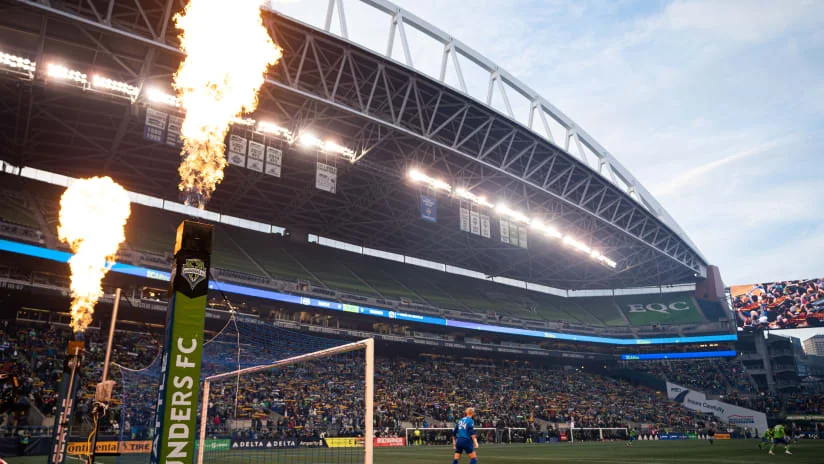
The October 28 Seattle guide lists gate opening separately from both match time and actual kickoff. That is the useful structure to copy when planning a visit. A venue’s general information page may describe its usual operation, while an event guide gives instructions for a specific opponent and date. Read the specific event information before relying on a general rule remembered from an earlier visit.
Build a personal arrival timeline
Work backward from when you want to be in your seat. Add time for the walk from the station or parking area, the entrance process and anything you need to do inside. If you are meeting friends, choose a location and a meeting time that leave room for those steps. Being outside the ground at the expected first whistle is different from being ready to watch it.
Prepare the things that can be handled before leaving home: the current ticket, the route to your entrance and the venue’s latest entry instructions. Families and visitors who need assistance may want more flexibility than someone who knows the stadium well. No single suggested arrival margin can guarantee a queue length, so adapt the plan to your group rather than borrowing another fan’s fastest visit.
Check transport updates independently. An old club notice can remain searchable long after its road closures or rail disruption have ended. Use it as a reminder that travel can affect arrival, not as proof that the same disruption exists tonight. Current transport information and the current matchday guide should describe the same date before you build your journey around them.
Arriving earlier also lets you enjoy the stadium rather than spending the first minutes catching up. Whether you want the warmups, introductions or simply a calm walk to your seat is a personal choice. Choose that experience deliberately instead of treating a presumed late kickoff as an arrival policy.
A practical checklist for viewers across time zones
International viewers need to solve two different conversions: the meaning of the advertised time and the time-zone difference. Adding ten minutes to a listing already converted to your device’s location does not tell you whether the listing was the presentation time or actual kickoff. Resolve the label first, then convert the precise time once.
For the Seattle example, the published 7:40 p.m. Pacific actual kickoff on October 28, 2026 corresponds to 10:40 p.m. Eastern that evening, 2:40 a.m. UTC on October 29, and 10:40 a.m. in Shanghai on October 29. These are conversions of the announced plan, not a report that the match started at those times. The date changes for some viewers even though the fixture remains an October 28 home game in Seattle.
Use a date-specific converter with named locations when daylight-saving changes are near. A remembered difference between your city and North America may be wrong for part of the year. Likewise, distinguish a site that automatically displays your local time from a page explicitly using the venue’s time. Converting a local display a second time can move your reminder by hours.
- Confirm the clubs, competition and local match date.
- Identify whether the number means coverage, match time or actual kickoff.
- Check the time zone printed on the source.
- Convert using that date, keeping any next-day change.
- Open the latest official status before settling down to watch.
If you are arranging a group watch, send a sentence with the label and time zone rather than a bare number. “Open the broadcast by this time; the club lists kickoff later” is clearer than “it starts at 7:30.” Friends joining from different places can then set their own reminders without guessing what you meant.
For viewing channels and daily fixture selection, our MLS schedule today viewing guide covers the broader questions. For the exact opening minute, return to the fixture’s detailed instructions. The useful habit is to keep the event, label, zone and latest status together.
Comments
Comments are reviewed before publication.
Spam, abusive content, personal information and policy-violating links are not published.
Sign in with Google to comment or reply.
Loading comments…