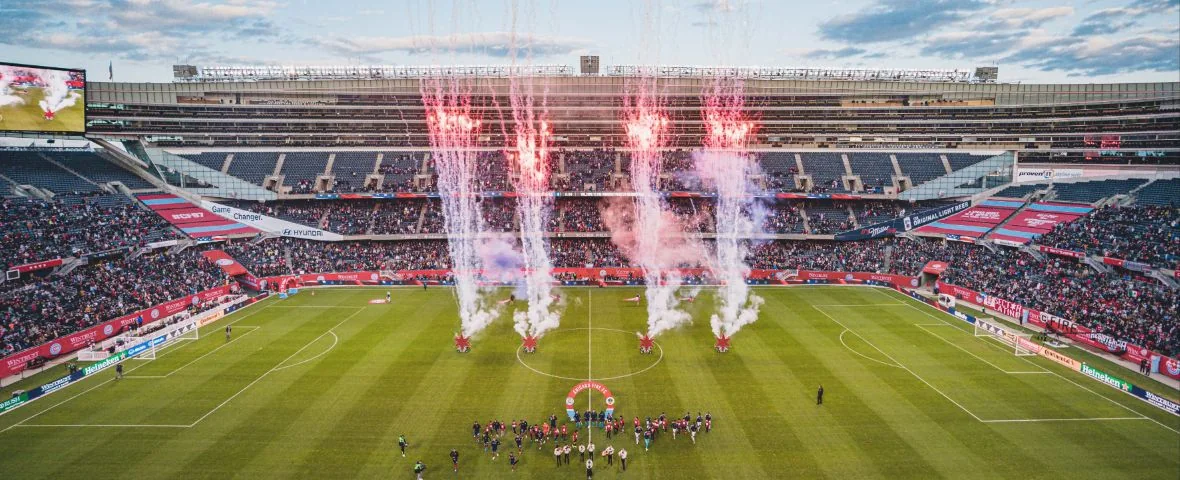
Updated October 18, 2026. Buy Chicago Fire FC tickets through the club's official single-match page and check the venue on the exact event. Soldier Field and SeatGeek Stadium are different destinations with different seating maps and arrival plans. In particular, the November 7 match against Columbus is assigned to SeatGeek Stadium in Bridgeview. Confirming that detail comes before comparing rows or reserving parking.
Confirm the home venue before buying Chicago Fire tickets
The official single-match page is the practical starting point for current Fire home purchases. It separates named fixtures and links to their ticket events. The club's wider ticket resources also identify memberships, groups, mobile guidance and Account Manager. Follow the route for the product you want, rather than assuming that every page displaying the club badge offers admission to the same event.
Record the opponent, date, competition, stadium and local kickoff time before selecting seats. A team marketplace page may contain away matches or an older event entry, while a general club description may simply name Soldier Field. The fixture-specific venue is the critical field. Check it against the latest club notice if two listings disagree, and resolve the discrepancy before committing to accommodation or transport.
This matters for local visitors as much as travelers. A meeting point near the lakefront does not solve a Bridgeview arrival, and an old parking order should not be presumed valid at another stadium. Share the confirmed event link with the party so everyone uses the same map and address. If one person is coordinating the tickets and another is driving, explicitly confirm that both are planning for the same venue.
The November 7 move to SeatGeek Stadium
The Fire's May 15 venue-change announcement moved the November 7 Columbus Crew match to SeatGeek Stadium because of a Soldier Field conflict with the Bears schedule. It retained a 3 p.m. Central Time kickoff. The club's current single-match page identifies the same Bridgeview venue. Treat that official assignment as the purchase reference rather than a stale Soldier Field marketplace entry.
The announcement also distinguished existing orders: direct Fire purchasers were to receive comparable relocated seating, while Ticketmaster and third-party resale purchasers were directed to refunds through the original point of sale and a new purchase. Members and premium holders received separate communications. These were instructions for that relocation, not a universal policy for every Fire schedule change.
If you already held tickets, inspect the account and the messages attached to the original order. Confirm what happened to admission, the seat assignment and any associated extras. Contact the original seller or club representative with the order number if the current status is unclear. Avoid buying a second order merely because an old listing remains searchable; first establish whether your existing purchase has already been resolved.
For a new buyer, open the current SeatGeek Stadium event through the club link and evaluate that inventory on its own terms. The name of the venue does not by itself identify the seller or the ticket-delivery account. Check those details on the actual order. Keep the confirmation with the updated fixture so the right information remains available when you prepare for matchday.
Compare prices, inventory and the cost of the whole outing
There is no single Chicago Fire ticket price that describes every match and location. Use the current total for the exact event, section, row and number of seats you need. A minimum price in a search result might refer to one isolated seat, another stadium or an away fixture. Treat it as a prompt to inspect inventory, not as a quote for your group.
Build a comparison with six fields: confirmed venue, seating location, quantity together, inventory type, total payment and included benefits. If one offer is resale and another club-controlled inventory, compare both against the same event identity. If a listing includes an upgrade, read what it provides. A hospitality label is not useful until you know whether the benefit is attached to that ticket or to a separate account privilege.
The Fire publishes match-specific ticket packs, including heritage and profession-related offers. Inspect the exact pack description, eligibility, purchase route and collection details. An ordinary ticket to the same game should not be assumed to include a pack item, and a promotion shown for another date should not be moved into your event by inference.
For a group, decide whether adjacency is essential before splitting purchases. Compare the full quantity in one listing and read any seat-location notes. Two cheap pairs in the same section may not solve a four-person outing. If someone may join later, tell them that the original purchase does not establish a neighboring seat will remain available. A club group-sales inquiry can clarify larger-party arrangements without guessing from a retail map.
Choose how much flexibility you actually have. If your date is fixed, compare acceptable areas and decide which viewing or access tradeoff is reasonable. If your itinerary is flexible, examine another home fixture in a similar location. Neither strategy guarantees a saving, and waiting until matchday can leave fewer choices. Set a total you are comfortable paying rather than trying to predict a universal cheapest purchase hour.
Read the club's ticket terms before assuming that a change of plans creates a refund. Dates, times and locations can change, and remedies depend on the relevant event and purchase terms. The November 7 relocation instructions are a useful specific case, but they should not be treated as a standing refund entitlement for another match. Keep the seller's event-change message with your original confirmation.
Price the rest of the visit alongside admission: the correct stadium's parking if you choose it, transport, accommodation and optional spending. Save those suppliers' separate terms. A ticket order being resolved does not automatically resolve a hotel or car-park booking. For someone considering several matches, use the existing MLS season-ticket comparison to assess a membership against realistic attendance, then obtain the Fire's current offer for the actual event list.
For an organized outing, use the Fire group-sales FAQ to prepare an inquiry rather than assembling a large party from unrelated resale orders. Give the representative the desired date, firm ticket count, seating needs and whether a group experience matters. Ask which conditions apply to the quote and when payment must be completed. Name one organizer to keep those answers with the participant list and handle any later changes.
Before accepting a pack or group proposal, distinguish three possibilities: an item explicitly included in that purchase, an experience subject to confirmation and a general matchday giveaway with its own conditions. Those benefits should not be treated as interchangeable. If the keepsake is the main reason you are choosing the offer, verify the applicable purchase link, quantity per ticket or order, and collection instructions before submitting payment.
Finally, decide how the group will handle an absent guest. Ask about the permitted transfer process and any restrictions before collecting everyone's contribution. A sensible plan identifies who owns the order, who receives each usable mobile ticket and who communicates a venue update. This keeps an inexpensive group quote from becoming a confusing set of individual assumptions, especially when some guests know Soldier Field and others expect to travel to Bridgeview.
Choose seats for the soccer configuration and your group
Use the soccer map attached to your event. Soldier Field also hosts other sports and entertainment, so a familiar football or concert recommendation is not enough to establish the Fire view. The club links a virtual venue from its ticket resources. Check the pitch orientation, goals, touchlines, benches and open seating areas before comparing a row number.
For SeatGeek Stadium, start again with that fixture's map. A relocated seat described as comparable is not necessarily the same section or row identifier, and a new buyer should assess the available Bridgeview inventory directly. Keep the correct stadium name on your comparison sheet. This prevents a useful photograph or recommendation from one venue being mistaken for an exact view in the other.
View, atmosphere and premium access
Choose a viewing priority. A broad sideline perspective can help you follow movement across the team; a position behind a goal offers a different angle on attacks and nearby supporter activity. Compare elevation and distance together rather than assuming that a lower row always improves the experience. Read any obstruction disclosure and ask about a view that is difficult to interpret on the map.
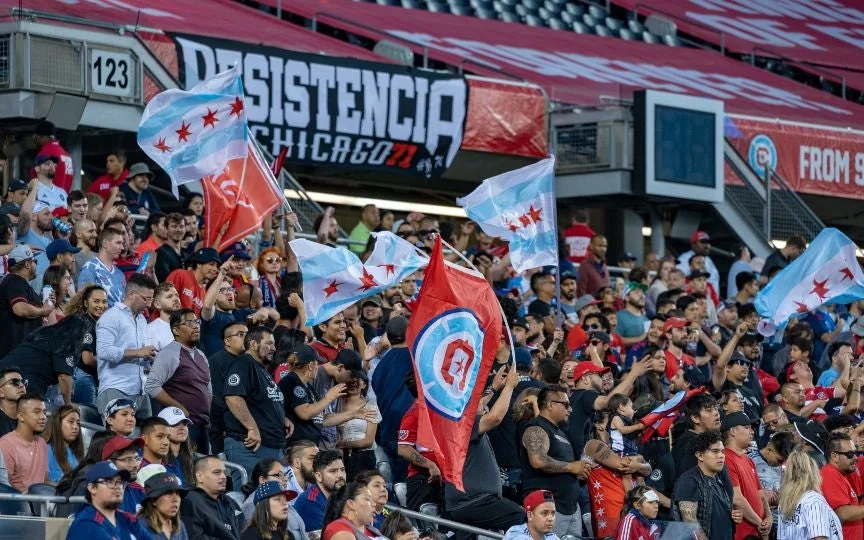
For an active supporters area, establish whether the ticket is assigned or general admission and whether standing, flags or other activity can affect the view. A visitor wearing the other team's colors should check the relevant section rules before purchasing. Someone who needs to stay seated should make that requirement clear instead of expecting an active area to behave like an ordinary reserved section.
The Fire's premium offerings describe Soldier Field options including suites and fieldside products. Ask for the inclusions attached to the exact match: lounge access, food, drinks, entrance and parking. A benefit described for a season or one premium product should not be assumed to accompany another ticket, especially after a venue change.
Also separate current admission from future-stadium sales. The club's September 2026 hospitality announcement concerns McDonald's Park, planned to open in 2028. Its new concepts do not describe a 2026 Soldier Field or Bridgeview match. Record the season and stadium when comparing an attractive premium offer or deposit.
Children, accessible positions and companion seats
Families should confirm the child-admission requirement for the specific match and seller before ordering. Published club and venue materials do not provide a fully consistent shortcut for every case, so resolve whether your child needs a ticket and a separate seat. Then consider the path to restrooms, stairs and the child's sightline, rather than choosing only by the lowest price.
For an accessible visit, discuss the actual needs with ticket services: wheelchair space, companion positioning, a step-free route, visibility when people stand or assistance between arrival and the seat. State the correct stadium at the beginning of that conversation. Avoid buying the surrounding group seats until the arrangement is clear, and keep the instructions with the order so the driver and guests understand the same arrival plan.
Mobile tickets and a matchday plan for the correct stadium
The Fire's mobile-ticket guide distinguishes purchases made through the club or its Account Manager from orders made on Ticketmaster.com. Use the account and email associated with your order. The club app provides a route through Tickets and Access My Tickets. If a resale order arrives as a transfer, complete the acceptance process until the actual tickets appear in the appropriate account.
The guide says screenshots and print-at-home PDFs are not accepted. Prepare the supported wallet option before departure, and confirm that the correct event is displayed. It also describes box-office assistance for supporters without a suitable smartphone or tablet; arrange help through the club rather than assuming that a printed receipt will serve as admission. Check the instructions for the stadium and date you are attending.
If everyone enters together, decide who is presenting the group's admission. If people arrive separately, complete the permitted transfers and ask each recipient to confirm access. An email saying a transfer is on the way is not the final check. Keep the original order reference and a charged phone available, particularly if the ticket was affected by a relocation and you may need help identifying the current event.
What to recheck before leaving home
Review the club's matchday information for the specific fixture. Identify which details describe a particular evening rather than a permanent routine. Save kickoff with its time zone, gate information and the appropriate arrival address. If you are attending the November 7 Bridgeview match, use the club's SeatGeek Stadium instructions rather than copying a lakefront arrival plan.
For Soldier Field trips, the club identifies Metra Electric stops at Museum Campus/11th Street and 18th Street and the CTA 146 bus as options to investigate. Check current service and the return journey before choosing one. The stadium approach includes walking and security, so a transit arrival time is not the same as being in your seat. Give anyone unfamiliar with the area the meeting point and the same destination reference.
The Soldier Field bag policy describes clear bags up to 12 by 6 by 12 inches and small clutches up to 4.5 by 6.5 inches, with review for necessary medical items. Read the current policy for what you carry and check the applicable Bridgeview requirements separately when that is your destination. Do not make a second stadium's entry decision from a Soldier Field photograph.
Before departure, confirm five practical answers: the ticket opens correctly, the venue is current, your bag complies, you know where the party meets and you have a way home. If any answer depends on a missing transfer or unresolved seat arrangement, contact ticket services while there is time to help. A clear order record and the correct stadium plan let the rest of the evening revolve around the game.
Comments
Comments are reviewed before publication.
Spam, abusive content, personal information and policy-violating links are not published.
Sign in with Google to comment or reply.
Loading comments…